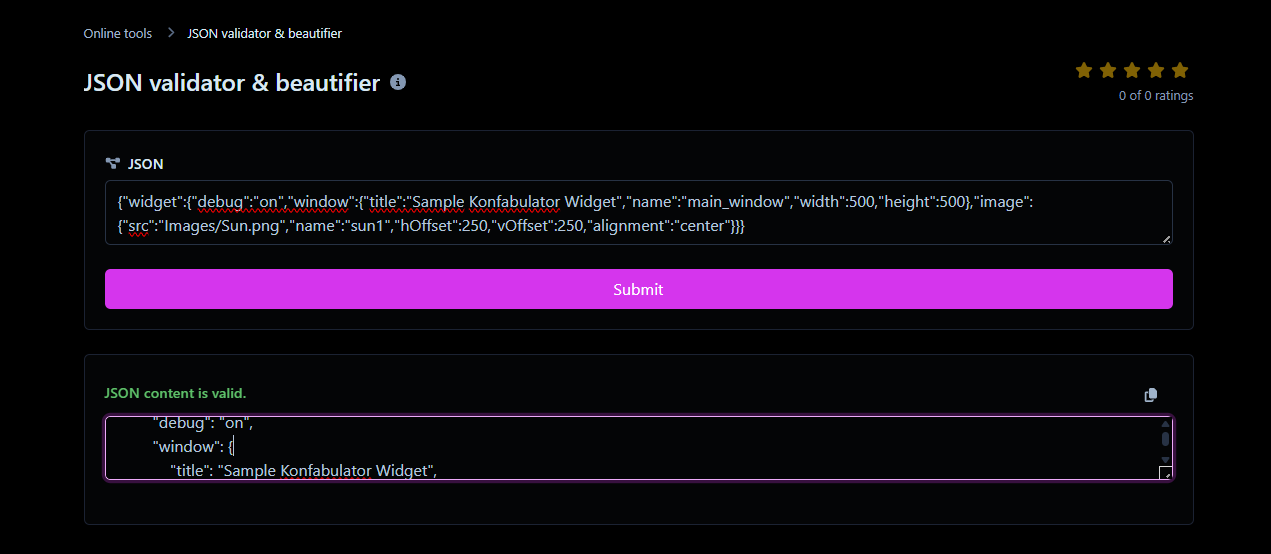
Struggling with messy JSON code? Use our free JSON Formatter to validate, beautify, and minify your data instantly. Perfect for developers and API debugging
Introduction
In the world of modern web development, data is king. But how that data moves between servers, APIs, and mobile apps is just as important as the data itself. Enter JSON (JavaScript Object Notation). It has become the de facto standard for data interchange, replacing older formats like XML.
However, there is a problem. Computers love JSON when it is "minified"—compressed into a single, endless line of text to save bandwidth. Humans? Not so much. trying to debug a 5,000-character line of code is a nightmare. A single missing comma or an extra bracket can crash an entire application.
This is why every developer, data analyst, and student needs a reliable JSON Formatter Tool. In this comprehensive guide, we will explore everything you need to know about JSON, common syntax errors, and how to use Toolyvo to clean, validate, and beautify your code in seconds.
Chapter 1: What is JSON and Why is it Popular?
JSON stands for JavaScript Object Notation. Despite its name, it is a text-based, language-independent data interchange format. While it was derived from JavaScript, today it is supported by almost every programming language, including Python, PHP, Java, C#, and Ruby.
The Rise of JSON
Before JSON, XML (Extensible Markup Language) ruled the web. XML was powerful but "heavy." It required opening and closing tags for everything, making files larger and harder to read. JSON introduced a lightweight alternative that was easy for humans to read and easy for machines to parse.
Key Characteristics of JSON:
- Lightweight: Less code means faster data transmission.
- Self-describing: It is easy to understand the structure just by looking at it.
- Hierarchical: Values can contain lists of other values (arrays) or even other objects.
Chapter 2: Understanding JSON Syntax and Data Types
To use a JSON Formatter effectively, you must understand the rules of the language. JSON is strict. Unlike JavaScript, which is forgiving, JSON will fail if you break a rule.
The 6 Data Types
A valid JSON file can only contain the following data types:
- String: A sequence of characters enclosed in double quotes.
- Correct:
"name": "Toolyvo" - Incorrect:
'name': 'Toolyvo'(Single quotes are not allowed). - Number: Integers or floating-point numbers.
- Example:
"age": 25or"price": 19.99 - Boolean: True or false values.
- Example:
"isLoggedIn": true - Null: Represents an empty value.
- Example:
"middleName": null - Object: A collection of key/value pairs enclosed in curly braces
{}. - Example:
{"id": 1, "status": "active"} - Array: An ordered list of values enclosed in square brackets
[]. - Example:
["red", "green", "blue"]
Chapter 3: The Problem with Raw Data (Minification vs. Beautification)
When you fetch data from an API (like Google Maps API or Twitter API), the response usually looks like this:
{"widget":{"debug":"on","window":{"title":"Sample Konfabulator Widget","name":"main_window","width":500,"height":500},"image":{"src":"Images/Sun.png","name":"sun1","hOffset":250,"vOffset":250,"alignment":"center"}}}
This is called Minified JSON.
Why Minify?
Developers minify code to remove unnecessary whitespace, newlines, and comments. This reduces the file size, allowing it to travel across the internet faster. For a computer, this is perfect.
Why Beautify?
For a human, minified code is unreadable. You cannot see the structure, the hierarchy, or where one object ends and another begins. This is where "Beautification" (or Prettifying) comes in. It adds:
- Indentation: Usually 2 or 4 spaces.
- Line Breaks: Puts each key-value pair on a new line.
- Colors: Highlights keys and strings for better visibility.
Chapter 4: Common JSON Errors (And How to Fix Them)
One of the main features of our JSON Formatter & Validator is finding errors. Here are the most common mistakes that break JSON code:
1. Trailing Commas
In JavaScript, leaving a comma after the last item in a list is fine. In JSON, it is a syntax error.
- ❌ Bad:
{"a": 1, "b": 2,} - ✅ Good:
{"a": 1, "b": 2}
2. Single Quotes
Many developers are used to using single quotes ' in Python or JS. JSON must use double quotes " for both keys and string values.
- ❌ Bad:
{'key': 'value'} - ✅ Good:
{"key": "value"}
3. Comments
You cannot add comments (like // this is a comment) inside a standard JSON file. If you try, the parser will fail.
4. Undefined Types
You cannot use functions, dates, or "undefined" as values in standard JSON.
Chapter 5: How to Use the Toolyvo JSON Formatter
Our tool is designed to be the ultimate utility for developers. It combines a Formatter, a Validator, and a Minifier in one interface.
Step-by-Step Guide:
- Paste Your Code: Copy your messy or minified JSON string from your server response or file and paste it into the main input box.
- Validate: The tool automatically checks syntax. If there is an error (like a missing bracket), it will alert you immediately, often pointing to the specific line number.
- Choose Your Mode:
- Beautify (Format): Click this to expand the code into a readable, tree-like structure.
- Minify (Compress): Click this if you want to remove all spaces to prepare the file for production use.
- Copy or Download: Once you are happy with the result, click the "Copy" button to grab the clean code.
Chapter 6: JSON vs. XML - The Showdown
Why has JSON taken over the world? Let's compare it to its predecessor, XML.
| Feature | JSON | XML |
| Readability | High (Clean syntax) | Medium (Tag heavy) |
| Size | Compact (Lightweight) | Verbose (Larger files) |
| Parsing Speed | Fast (Native to browsers) | Slower (Requires XML parser) |
| Data Types | Supports Arrays, Objects | Everything is a node/text |
| Comments | Not supported | Supported |
Verdict: While XML is still used in some enterprise systems and configuration files (like SVG images), JSON is the clear winner for web APIs and modern applications.
Chapter 7: Advanced JSON Use Cases
Beyond simple APIs, formatting JSON is crucial for:
- VS Code Settings: If you use Visual Studio Code, all your settings are stored in a
settings.jsonfile. A single syntax error here can reset your theme or break your editor. - Database Exports: NoSQL databases like MongoDB store data in BSON (Binary JSON). When you export this data, it comes out as JSON.
- Package Management: The
package.jsonfile in Node.js projects controls all your project dependencies. It must be perfectly formatted to work.
Chapter 8: Frequently Asked Questions (FAQ)
Q: Is it safe to paste my private data here?
A: Yes. The Toolyvo JSON Formatter runs on the "Client-side." This means your code is processed in your own browser and is never sent to our servers. Your data remains 100% private.
Q: Can JSON store images?
A: Not directly. JSON is a text format. However, you can convert an image into a Base64 string and store that string inside a JSON field.
Q: Why does my JSON have a "Parse Error"?
A: This usually means you have a syntax mistake. Check for missing quotes, trailing commas, or unclosed brackets }. Our tool will highlight these errors for you.
Conclusion
Whether you are debugging a complex API response, configuring your development environment, or just learning to code, clean data is essential. Don't waste hours staring at a wall of text trying to find a missing comma.
Use the Toolyvo JSON Formatter, Validator, and Beautifier to streamline your workflow. It is fast, free, and secure.
Try the Tool Now and experience the joy of clean code!